
Support
How can we help?
Tips, print settings, material comparison, downloads and available colours – everything about Fiberlogy filaments in one place.
Tips and answers
Practical tips Which nozzle to use for fiber-reinforced filaments?
Filaments containing glass or carbon fiber (e.g., Nylon PA12+CF, PA12+GF, PETG+CF, PETG+GF, PCTG+CF, PCTG+GF, ABS+GF) are highly abrasive to a standard brass nozzle — its lifespan when regularly printing with such materials can be reduced to just a few to a dozen or so spools, and a worn nozzle degrades print quality (irregular line width, reduced dimensional accuracy).
Recommendation: for printing with CF/GF filled materials, use a hardened steel nozzle or one with a tungsten carbide/ruby insert — a standard brass nozzle is not designed for this.
Practical tips How to determine the Flow Rate and Flow Dynamics (K-factor) for a given filament?
Even with the correct printing temperature, a poorly calibrated material flow can cause under-extrusion, excess material (over-extrusion, “blobbing”), poor surface quality, or imprecise dimensions.
- Flow Rate (Flow Ratio) — determines how much material actually flows out of the nozzle compared to what the slicer “ordered.” It varies between filament manufacturers and production batches (even with the same nominal diameter of 1.75 mm). Calibration is recommended for every new roll/batch of material — most slicers (Bambu Studio, PrusaSlicer, Orca) have a built-in calibration test.
- Flow Dynamics / Pressure Advance / K-factor — compensates for the delay in pressure build-up and drop within the nozzle during speed changes (e.g., at corners, direction changes). A poorly chosen K-factor manifests as uneven edges, oozing at corners, or inaccurate details.
Practical tips Can Fiberlogy filament be used in food contact applications?
The raw material used in the clear versions of Fiberlogy filaments—PET-G, Easy PET-G, PCTG, and CPE HT—is approved for food contact.
Downloads:
- Declaration of Conformity – PET-G Pure TR
- Declaration of Conformity – Easy PET-G Pure TR
- Declaration of Conformity – PCTG Pure TR
- Declaration of Conformity – CPE HT
If a company intends to manufacture products intended for sale and/or intended to come into contact with food, it is the responsibility of the manufacturer of the final product to obtain all necessary certifications.
Approving the final product (a 3D-printed object) for food contact is a complex issue influenced not only by the raw material but also by the conditions under which the final product is manufactured (the printer, the environment, and the model’s geometry). Microorganisms can accumulate and multiply in the interlayer voids of each print.
Practical tips Filament and Moisture
Because the polymers used in 3D printing exhibit varying degrees of hygroscopicity—that is, the ability to absorb moisture from the environment—print quality may deteriorate over time. Improper storage of the filament accelerates this process.
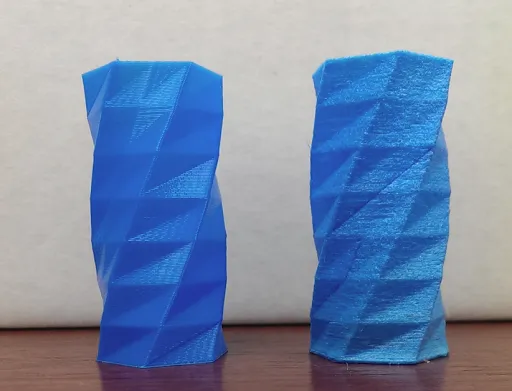 Comparison of Dry and Wet Filament
How can you tell if the filament has become damp?
- hissing and crackling of the filament as it is extruded from the nozzle;
- reduced adhesion between layers;
- a deterioration in the mechanical properties of the finished prints;
- a deterioration in the visual appearance of the printed surface.
Where should I dry 3D printing filament?
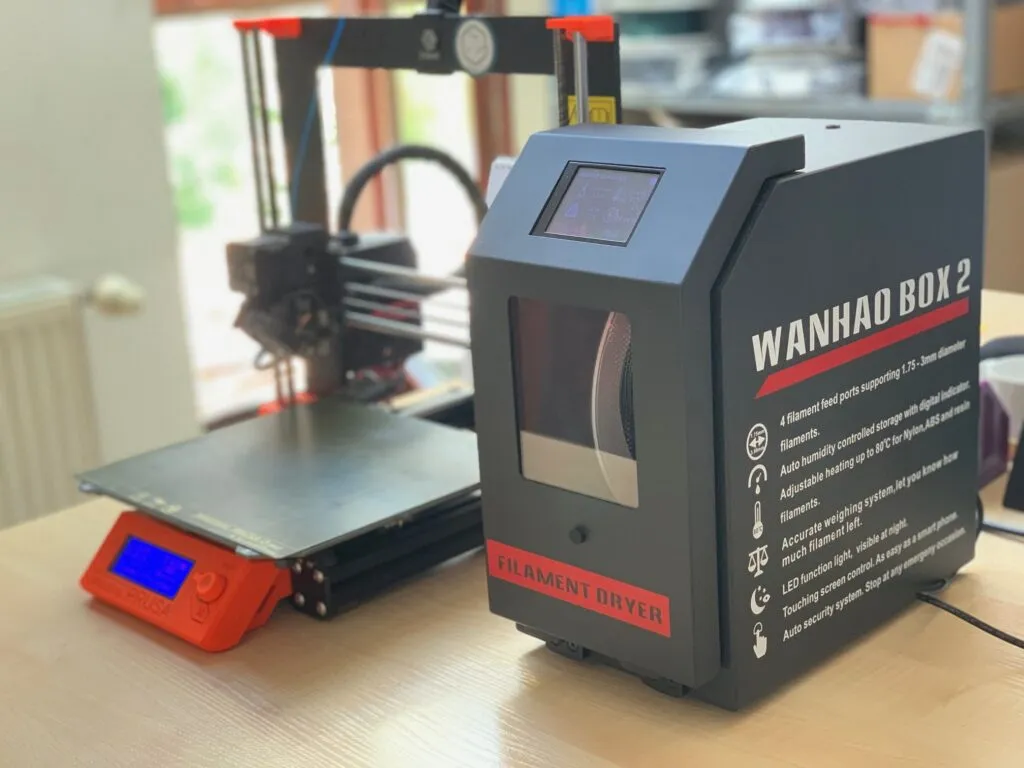
Filament dryer – professional filament dryers are very useful when working with materials that tend to absorb moisture from the environment, and the investment can quickly pay for itself.
Oven – A home oven works very well as a filament dryer. However, when using it for this purpose, you must be very careful about temperature fluctuations and make sure to set the appliance correctly so that it doesn’t accidentally set to 160°C instead of, say, 60°C. Another important consideration is whether to dry the polymer in an appliance intended for food use—in other words, whether you want your printed object to have a “subtle hint” of nylon or ABS.
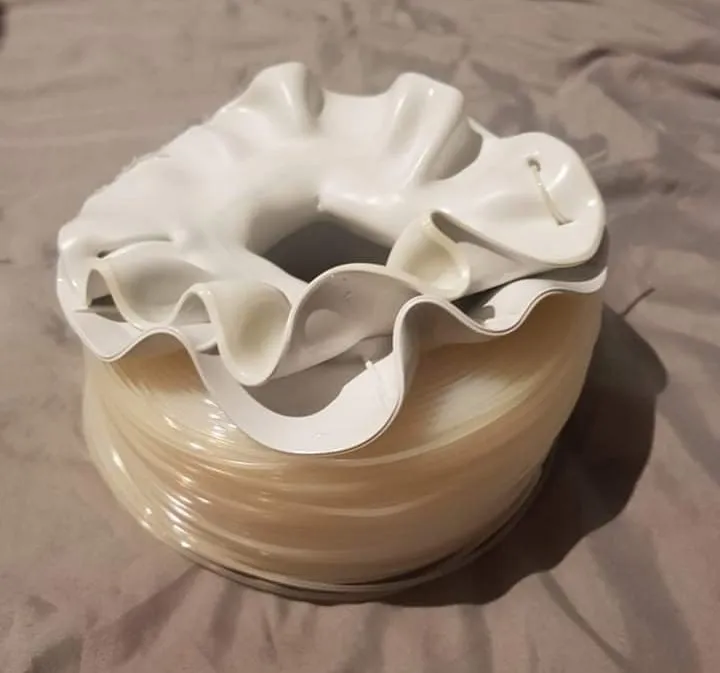 It was supposed to be 80°C, but it turned out to be 180°C
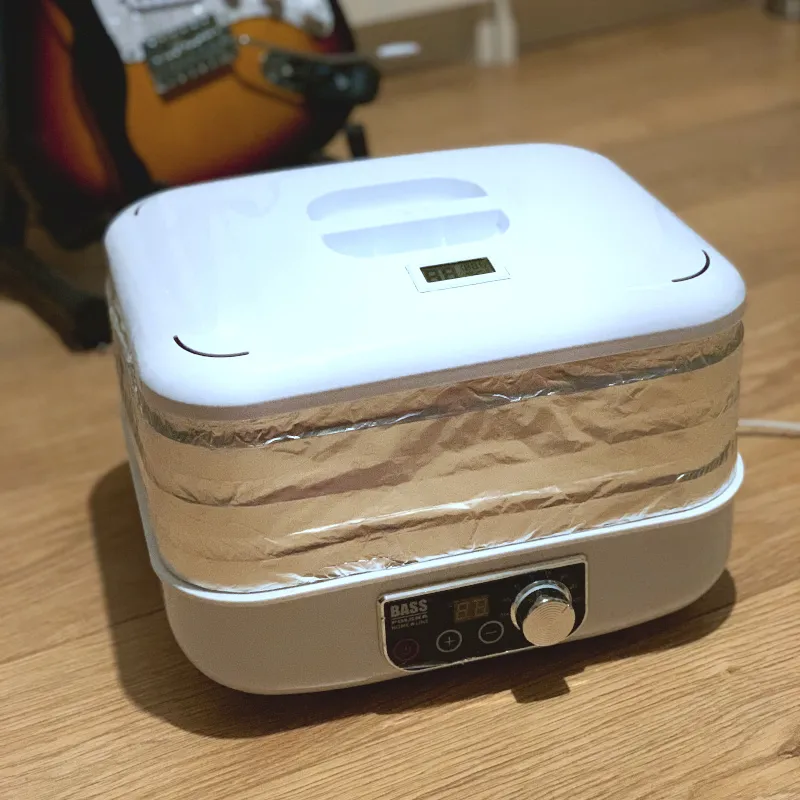
Fruit and Vegetable Dehydrator – With a few minor modifications, popular home food dehydrators can very effectively replace their professional and expensive counterparts.
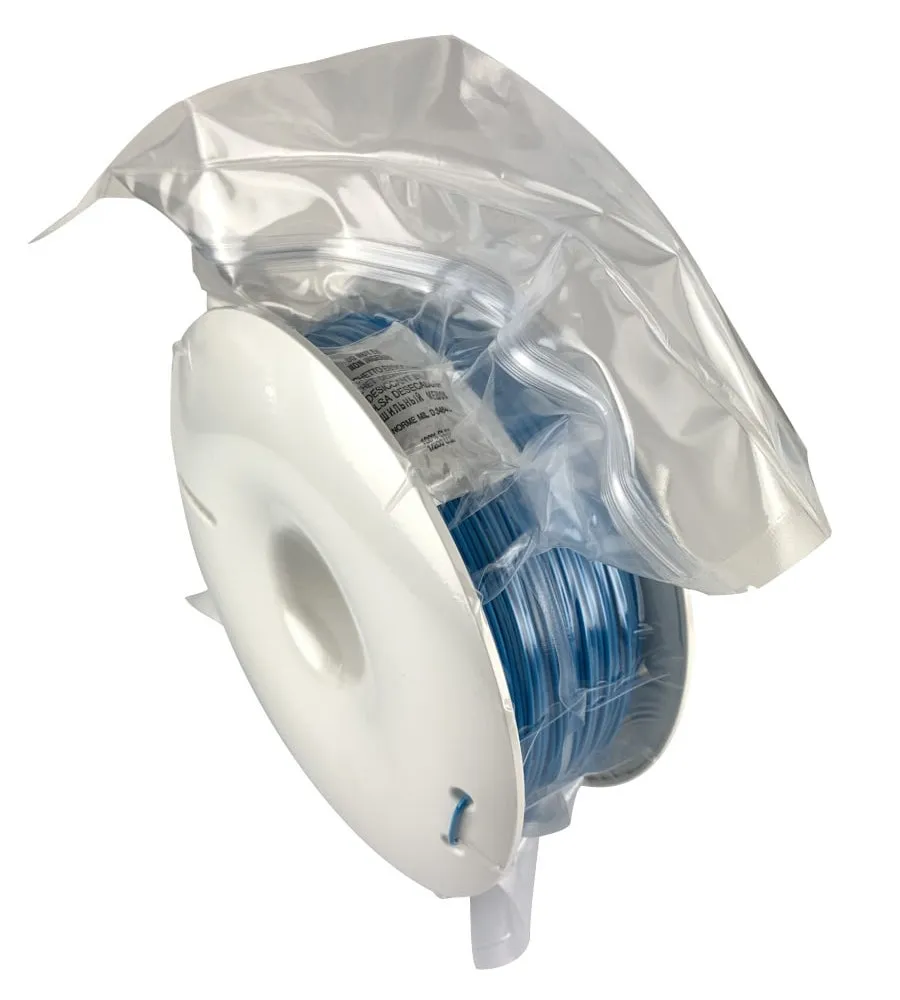
Filament Temperatures and Drying Times
- PLA, FiberWood: 50°C / 4 hours
- ABS: 60°C / 4 hours
- ASA, PA12+CF15, PA12+GF15: 80°C / 4 hours
- BVOH: 50°C / 4 hours
- PET-G, CPE HT, PCTG: 60°C / 4 hours
- FiberSatin, FiberSilk: 40°C / 4 hours
- PA12: 70°C / 4 hours
How should I store filament to keep it dry?
Fiberlogy filament is supplied in a resealable bag along with a desiccant. We recommend storing the filament in this bag after each use. Materials such as nylon should be printed directly from a dryer or a tightly sealed container.
General tips Can I buy filament on the Fiberlogy website?
Yes, Fiberlogy filaments can be purchased directly through our official online store at fiberlogy.com.
Our products are also available through a network of Resellers in many countries around the world. This makes it easy to access Fiberlogy filaments in many locations.
A list of resellers for our 3D printing filaments can be found at this link.
General tips Where can I find models for 3D printing?
Printables
This is probably the best place to start, especially if you’re looking for models for everyday use: organizers, holders, parts, gadgets, decorations, and more. The platform is run by Prusa Research (the manufacturer of, among others, the Prusa MK4, Prusa CORE One, and Prusa XL printers) and has a very active community. A major advantage is the well-documented models, photos of users’ prints, comments, and the ability to filter models by factors such as material, printer, and print settings.
MakerWorld
A platform owned by Bambu Lab (the manufacturer of, among others, the Bambu Lab A1 and Bambu Lab X1C printers). It is particularly useful for Bambu Lab printer users, as many models come with ready-to-use print profiles, often including support for AMS and specific materials. The platform is very active and has grown rapidly in recent years.
Thingiverse
One of the oldest and best-known platforms of its kind. It has a huge archive of models, including many that were created years ago and may not be available on newer platforms. The downside is that the quality of both the models and their descriptions can vary greatly, and the search function doesn’t always work perfectly. Despite this, it is definitely worth checking out, especially when you can’t find what you’re looking for on Printables.
Cults3D
Cults3D has a slightly different character — you’ll find both free and paid models there, with paid projects making up a significant part of the platform. There are plenty of figurines, decorations, artistic models, cosplay designs, and all kinds of interesting projects that you may not necessarily find on Printables. However, it’s always worth checking the license, especially if you plan to sell your prints.
MyMiniFactory
This platform is particularly strong when it comes to figurines and models for games. It’s one of the first places worth checking if you’re looking for fantasy miniatures, D&D models, terrain, or models primarily designed for resin printing. It offers both free and paid models, as well as a subscription system for creators.
Thangs
Thangs is a little different from the others because, in addition to its own library, it also works as a search engine for models hosted in different places across the internet. One particularly interesting feature is the ability to search for models based on their shape or geometry, rather than just by name. This can be especially useful when looking for a specific mechanical part, for example.
Yeggi
Yeggi is not a typical model database, but rather a search engine for 3D files. You enter a keyword, and Yeggi searches various websites and displays the models it finds. This is very convenient if you don’t want to search through several websites separately.
Creality Cloud
Creality’s platform, functionally similar to MakerWorld. It offers a large selection of free models and is a particularly natural choice for users of Creality printers.
GrabCAD Library
This website is intended for engineers, designers, manufacturers, and students who are looking for more advanced projects or want to share the results of their work. Not all models marked as suitable for 3D printing will actually print successfully.
General tips What are the applications of 3D printing?
Engineering
3D printers are proving useful in various fields of engineering. Thanks to modern technology, it is possible to create functional prototypes and quickly test their performance and properties, as well as easily make improvements to the design. The time and cost savings involved in preparing components are also significant.
Recommended filaments: FIBERFLEX 40D, PLA IMPACT, NYLON PA12+CF, NYLON PA12+GF, PEI 9085.
Education
The education sector is taking full advantage of the benefits offered by 3D printing. It is possible to conduct classes on 3D printing technology or teach CAD design skills, as well as to develop and improve various types of products. The choice of filaments should be based on the nature of the print and the desired result.
Recommended filaments: all.
Production
The manufacturing industry’s expectations are clearly defined: it is important to seek out the best solutions while optimizing costs. Thanks to 3D printing, it is possible to produce concept models or parts in small batches quickly and easily. This allows for testing the functionality of components and reducing expenses associated with high-volume production.
Recommended filaments: PLA IMPACT, EASY PLA, FIBERFLEX 40D, EASY PETG, ABS.
Product Design
Creating product models using traditional methods can be time-consuming and financially unfeasible. 3D printing is a modern technology that allows you to produce realistic prototypes quickly and at a low cost. It is possible to easily create even highly complex shapes, which allows for efficient revisions and improvements to designs.
Recommended filaments: PLA IMPACT, EASY PLA, HIPS, PLA FIBERWOOD, PLA MINERAL, EASY ABS, EASY PETG.
Art
Artists particularly appreciate the capabilities of 3D printers, which are used to create jewelry, masks, ornaments, and decorative elements. 3D printing is used in many art studios, where it has become a technology that enables artists to bring even the most unconventional projects to life.
Recommended filaments: PLA IMPACT, EASY PLA, HIPS, FIBERWOOD, PLA MINERAL, PLA FIBERSILK, PLA FIBERSATIN
Toys
New technologies and the toy industry may seem worlds apart, but they actually have a lot in common. Using a 3D printer, it’s possible to create many original toys for children that would be time-consuming and costly to produce using traditional methods. A variety of modern filaments can be used to make building blocks, characters, animal figurines, and more.
Recommended filaments: PLA IMPACT, EASY PLA, FIBERFLEX 40D, PLA FIBERWOOD.
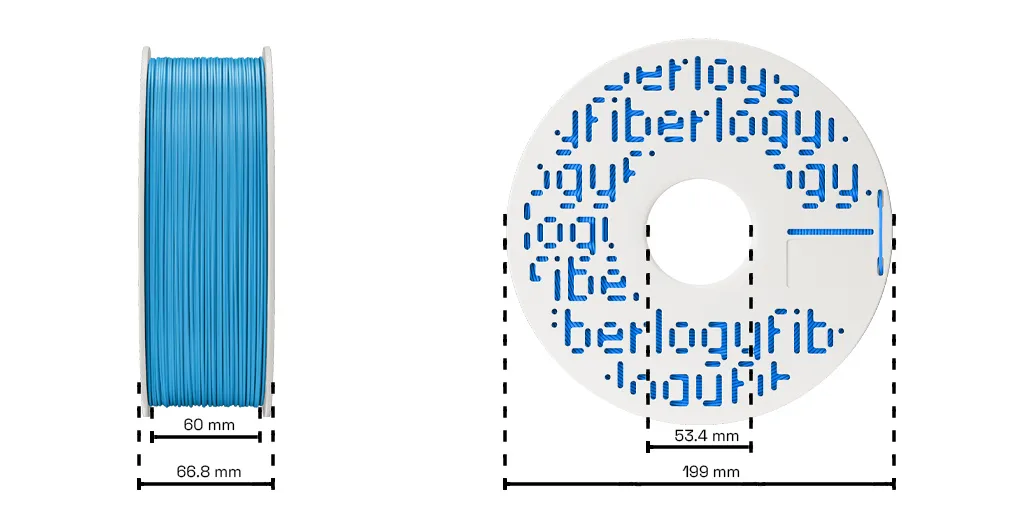
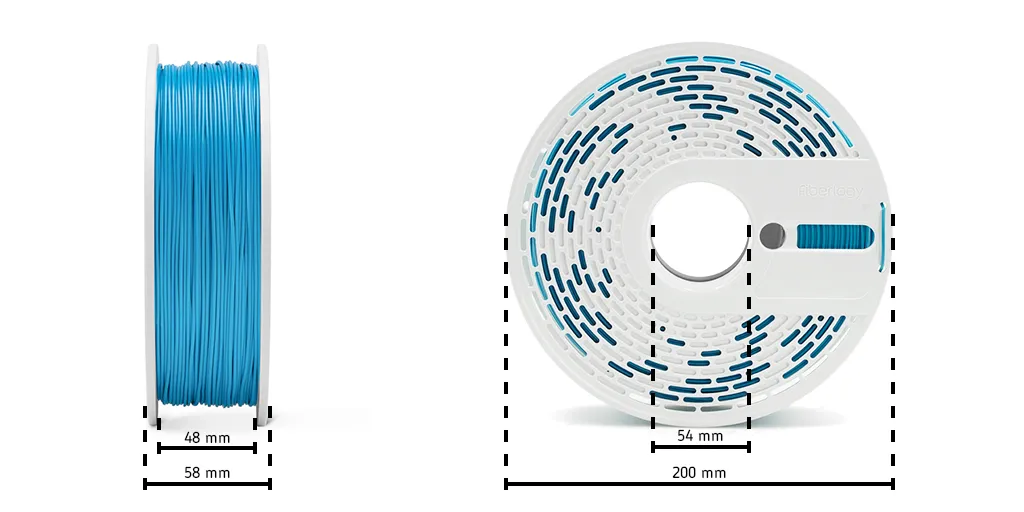
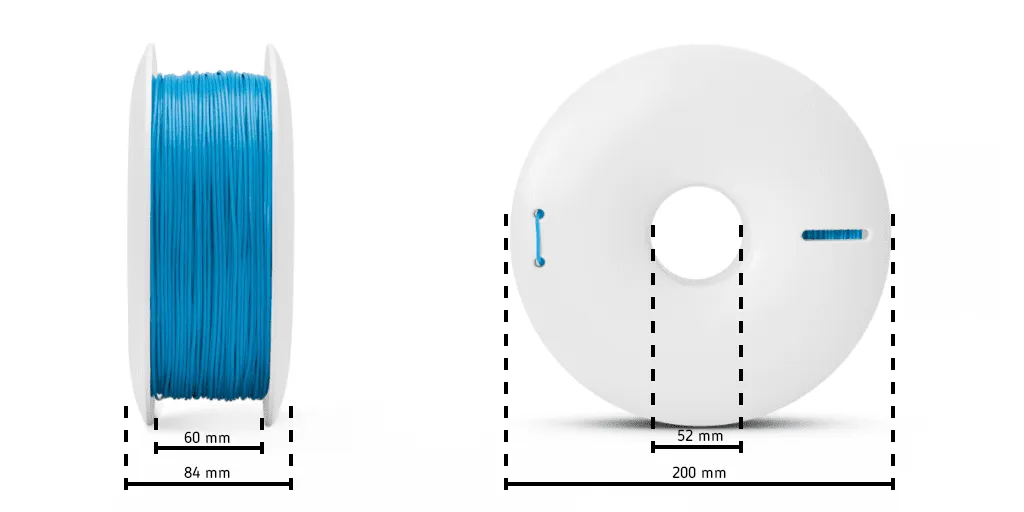
General tips Weight and Dimensions of the Fiberlogy Spool
News Fiberlogy Spool (S3): approx. 275g
S2 spool: approx. 290 g
S1 spool: approx. 330 g
General tips How do you install a refill on a Fiberlogy spool?
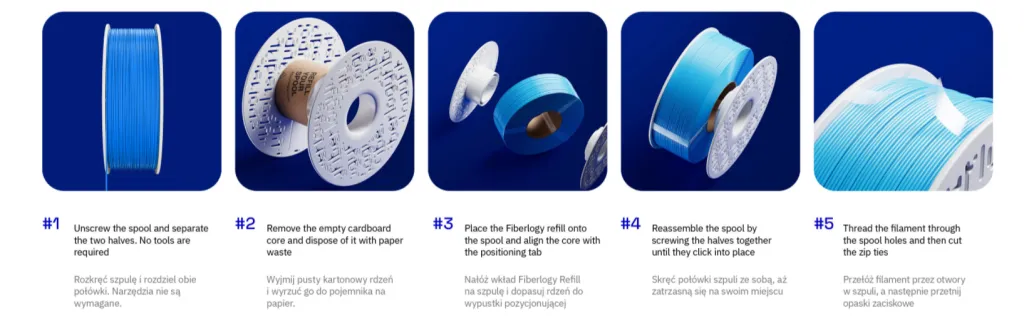
General tips Are Fiberlogy filaments compliant with the RoHS and REACH directives?
All filaments we manufacture comply with the RoHS and REACH directives. More detailed information about the filaments is provided in the MSDS documents published on the individual product pages.
Download: RoHS Declaration
The RoHS Directive, which restricts the use of substances that pose a risk to the environment.
The RoHS Directive (Restriction of Hazardous Substances), dated January 27, 2003 (2002/95/EC), came into effect on July 1, 2006. This directive was transposed into Polish law by the Regulation of the Minister of Economy of March 27, 2007, on specific requirements regarding the restriction of the use in electronic and electrical equipment of certain substances that may have a negative impact on the environment (Journal of Laws No. 69, item 457). The purpose of the directive is to reduce the amount of hazardous substances released into the environment from electrical and electronic waste.
The RoHS Directive requires manufacturers of electrical and electronic equipment to use the following substances in quantities not exceeding the minimum levels specified by law:
- Lead (Pb)
- Mercury (Hg)
- Cadmium (Cd)
- Hexavalent Chromium (Cr+6)
- Polybrominated diphenyl ethers (PBDE)
- Polybrominated biphenyls (PBBs)
REACH is a European Union regulation adopted to improve the protection of human health and the environment from the risks that chemicals may pose, while enhancing the competitiveness of the EU’s chemical industry. It also promotes alternative methods for assessing the risks posed by substances in order to reduce the number of animal tests.
In general, REACH applies to all chemical substances—not only those used in industrial processes, but also those in our daily lives, such as in cleaning products, paints, and in products like clothing, furniture, and electrical appliances. Therefore, this regulation affects the operations of most companies throughout the EU.
REACH places the burden of proof on companies. To comply with the regulation, companies must identify and manage the risks associated with the substances they manufacture and place on the market in the EU. They must demonstrate to ECHA how a substance can be used safely and are required to provide users with information on risk management measures.
If a risk cannot be managed, authorities may restrict the use of the substance in various ways. Ultimately, the most hazardous substances must be replaced with less hazardous ones.
REACH stands for Registration, Evaluation, Authorization, and Restriction of Chemicals. This regulation entered into force on June 1, 2007.
Printing problems How can you prevent the print from peeling off the build plate?
A print peeling off the build plate or a lack of adhesion on the first layer is one of the most common causes of failure in 3D printing. There can be several reasons for this:
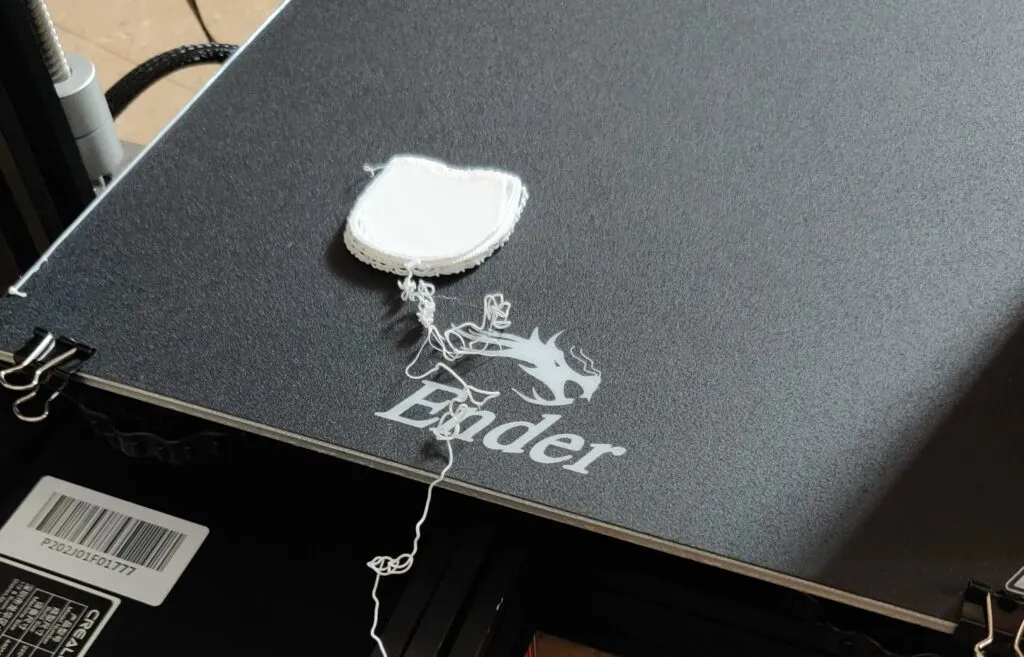 source: Reddit u/sdssen
Correct build plate (bed) selection
Not every build plate is suitable for every material — printer manufacturers (e.g., Bambu Lab) offer different types of surfaces tailored to specific filament groups (compatibility list).
For Nylon PA12, the Engineering Plate (reinforced thermosetting coating on spring steel) works best — it is more mechanically resistant than PC or PEI sheets and better withstands the high bed temperatures required by nylon. However, it requires the careful application of glue (e.g., Magigoo PA or dedicated Bambu glue) — without it, adhesion will be insufficient.
Cool Plate (PC sheet) — is designed exclusively for PLA and may deform or blister at higher temperatures (PA12, ABS).
A Dirty Table
The reason is mundane, but it is very often exactly what stands in the way of a successful print. A properly prepared print bed should be cleared of residue from previous prints and degreased using, for example, glass cleaner, isopropyl alcohol (IPA), vinegar, or soapy water.
A table that isn’t level
Depending on the printer, it may be equipped with an automatic table leveling system or may require manual adjustment, for example, by adjusting the tightness of the screws. You can find instructions on how to level the table in your printer’s documentation.
The nozzle is too far from the table
To achieve a perfect first layer, the correct height of the nozzle above the build plate (Z-axis) is crucial. The ideal layer should be slightly compressed, but the nozzle should not sink into the filament that has already been deposited.
The height of the first layer can be adjusted directly from the printer’s control panel by raising the Z-axis in so-called “baby-steps.” Setting a negative value moves the nozzle closer to the bed, while positive values move it farther away.
Low table temperature
Increasing the temperature of the print bed can improve the chances of the polymer adhering properly to its surface. This prevents the material from shrinking as it cools, which is caused by the fan cooling the print as well as drafts on printers with an open chamber.
Recommended table temperatures:
- PLA / FiberFlex: 50–70 °C
- PET-G: 90°C
- ABS / NYLON: 90–110°C
Poor adhesion
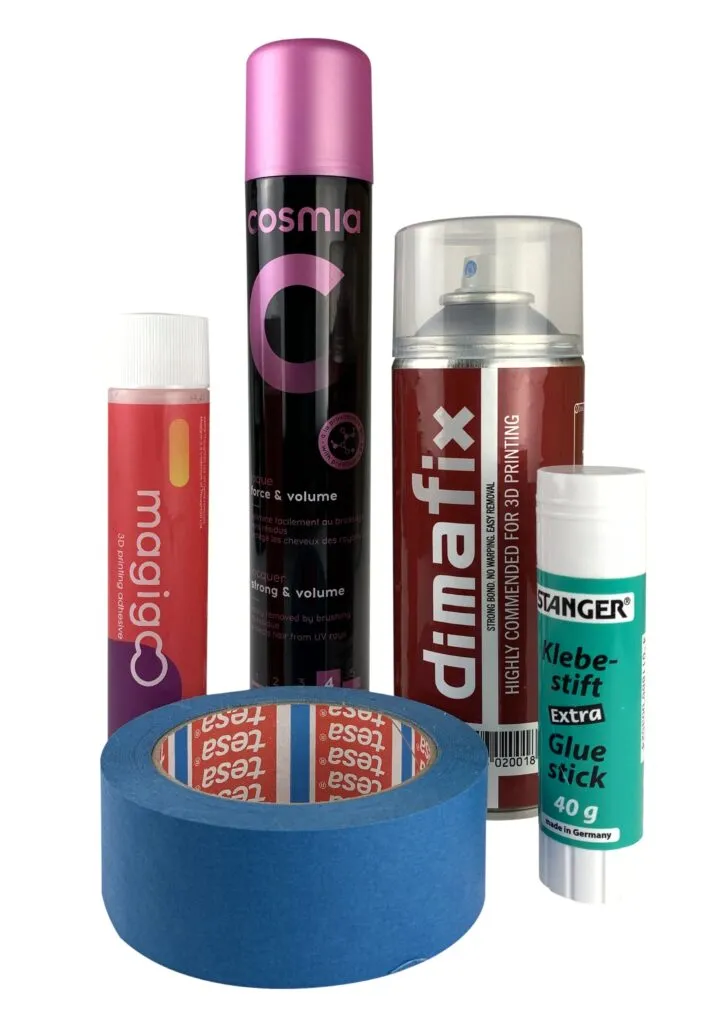
If the above tips do not help, it may be necessary to increase adhesion by using additional structures, such as a brim or a raft, or by using adhesion-enhancing agents.
The latter category includes specialized cleaning products such as sprays (e.g., Dimafix) and liquids (Magigoo).
However, it’s not uncommon for household remedies such as masking tape (e.g., TESA), hairspray, or a PVA glue stick to work perfectly.
Printing problems Why don't the print layers bond together, or why do they crack?
Insufficient interlayer adhesion weakens the model and, as a result, causes it to crack. Possible causes include:
Print temperature is too low
Printing at too low a temperature causes the polymer to cool too quickly, preventing the individual layers of the model from bonding firmly. Raising the print temperature by a few or a dozen degrees will improve the results.
The airflow is too strong
Excessive cooling will also weaken the bonds between layers. For filaments such as PET-G, ABS, ASA, Nylon, and CPE HT, it is recommended to use the minimum airflow setting and, whenever possible, to turn it off (where the model’s geometry does not require it, e.g., overhangs, bridges).
No enclosed chamber
PLA and PLA-based filaments can be easily printed on almost any 3D printer. However, for many materials that require higher temperatures—such as ABS or nylon—it may be necessary to create the right conditions to produce a durable model. The most important factor here is protecting the print from drafts of cool air (e.g., air conditioning, an open window) and maintaining a constant ambient temperature throughout the printing process to prevent the central parts of the model from shrinking.
The layer is too thick
The layer height has a significant impact on the model’s print speed. However, setting this parameter too high can prevent subsequent layers from being “pressed” into the previous ones with sufficient force. It is generally accepted that the proper ratio between the diameter of the nozzle used and the layer height should be approximately 1.25. This means that for a 0.4 mm nozzle, the layer height should not exceed 0.32 mm.
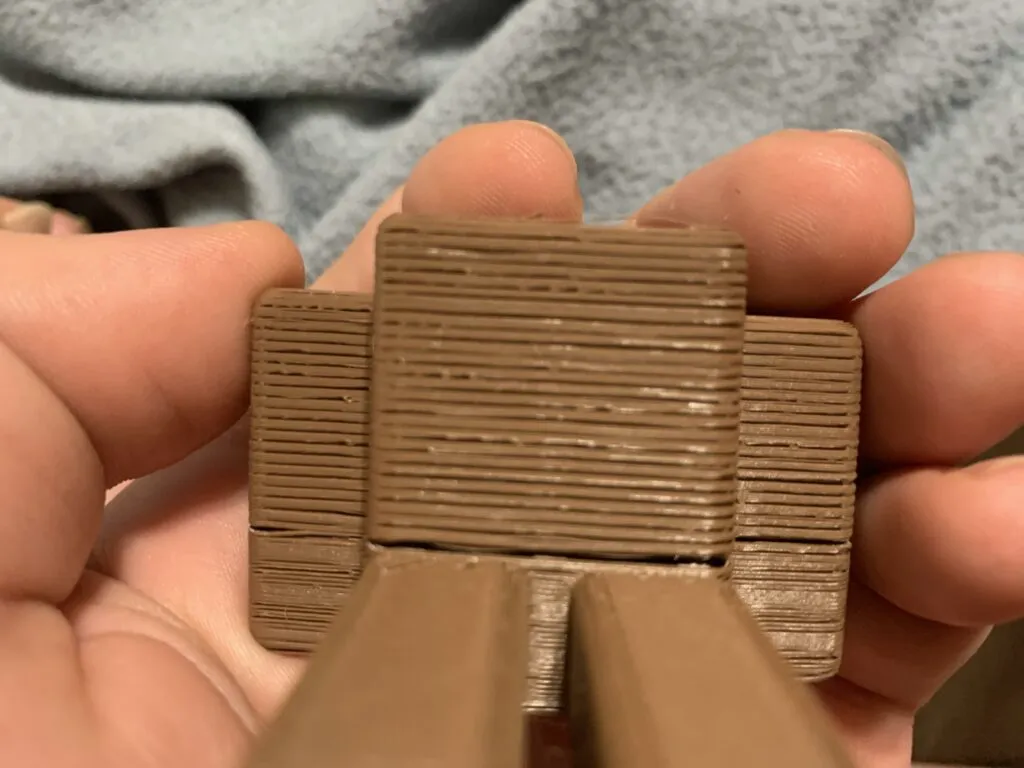 Source: Reddit u/cakeman624
Printing problems Why do the corners of the printout curl up?
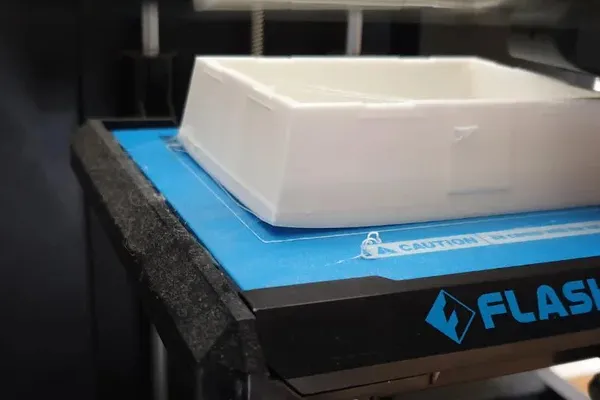 Source: Reddit u/Cry0nix
Polymers designed for 3D printing have varying degrees of shrinkage, which classifies them as either easy or difficult to print.
| Easy-to-print materials (low shrinkage) | Relatively easy (relatively low contraction) | Materials that are difficult to print (high shrinkage) |
| – PLA – Copolyesters (e.g., PET-G, PCTG) | – ASA – Flexible filaments – PP | – ABS – Nylon – PC |
How can you prevent the bottom layers of a 3D print from shrinking?
Use of Adhesive Preparations
Adhesives help improve the polymer’s adhesion to the printer bed.
| Material | Adhesive |
| PLA | masking tape, PVA glue, hairspray |
| ABS / ASA | Kapton tape, ABS “juice” |
| PET-G / PCTG | masking tape, hairspray |
| PA12 | Magigoo PA |
| FiberFlex / MattFlex | masking tape |
| PP (Polypropylene) | office tape |
Turning off the airflow in the lower levels
If the lower parts of the model cool down too quickly, it can cause the corners to curl up and, as a result, even cause the model to peel away from the build plate during printing.
Use of a brim or raft
The purpose of the brim and raft is to increase the contact area with the table surface. They are designed to prevent the actual model from lifting off the work surface.
Printing problems Why are there strings left on the printout?
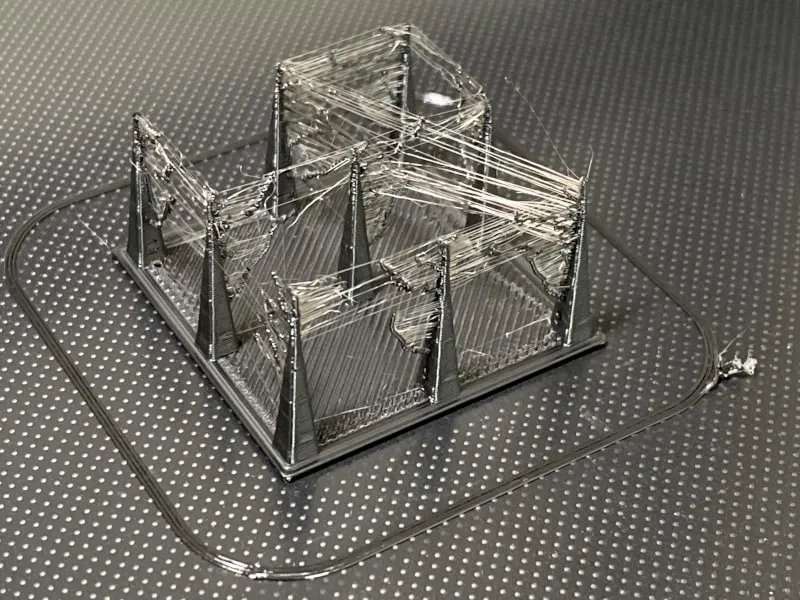 Source: Reddit u/osgeo
Retraction Settings
Setting the retraction correctly essentially comes down to two factors:
- retraction length
- retraction speed
The retraction length specifies how many millimeters the material should be retracted during the retraction process. This value will vary depending on the material and the type of extruder. A “direct” extruder requires a shorter retraction (about 0.5–1.5 mm). A Bowden extruder—one in which a long Teflon tube runs between the extruder and the nozzle—requires a longer retraction, e.g., 5 mm. Too long a retraction can lead to clogging if the molten filament is pulled back into the cold zone of the hotend.
The retraction speed determines how dynamically this movement should be performed. If retraction is too slow, it will not be effective because it will allow filament to continue flowing out before it is retracted. If it is too fast, it may cause the nozzle to clog or leave a fragment of molten polymer inside it. A fast retraction can also cause the filament to be damaged by the extruder gear.
Finding the right setting often requires numerous attempts, and retraction tests are helpful in this process.
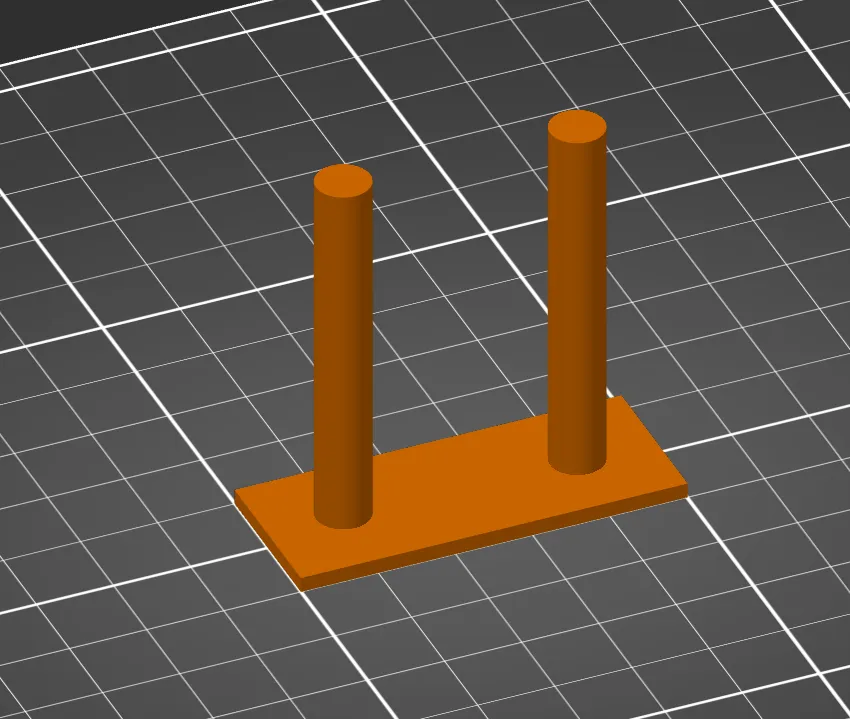
Temperature too high
An overheated filament will have a higher viscosity, which will consequently reduce the effectiveness of retraction. Gradually lowering the temperature—for example, by 5°C—should help resolve the issue.
Moist filament
Moisture absorbed by the filament from the environment can also cause stringing during retraction. Water droplets present in the nozzle cause a pressure drop in the nozzle, leading to uncontrolled filament flow and reduced retraction efficiency.
Filament vs. Stranding
Some types of filament are more prone to stringing than others. Examples of such filaments include:
- FiberWood
- polyesters (PET-G, PCTG, CPE-HT)
- FiberFlex (due to the recommended short retraction)
Printing problems Why isn't the filament coming out of the nozzle?
There are several possible reasons why filament isn’t coming out of the nozzle. The most common ones are:
Print temperature is too low
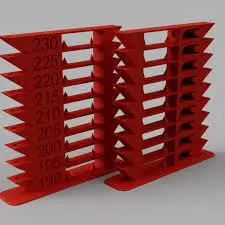
Increase the nozzle temperature. To find out the temperature range in which the filament performs best, you can print a temperature tower for that material.
Clogged nozzle
This problem can occur, for example, if the filament contains glitter or wood particles, or if it has become contaminated due to improper storage (always store filament in an airtight bag). In this case, you can try a “cold pull,” which involves pulling the filament—which has cooled to a certain extent—out of the nozzle.
The filament is not being fed through the extruder
This may be caused by the knurling pressure being too weak or too strong. In the latter case, the filament may be scraped, causing a buildup of particles that can clog the Teflon tube. For flexible filaments (FiberFlex, MattFlex, TPE, TPU), excessive pressure can cause the filament to wrap around the knurling wheel.
The nozzle is too close to the table
Lowering the bed or raising the nozzle will allow the filament to flow out of the nozzle, preventing the material from getting clogged.
No tips match your search.
Print settings
Choose a filament to see the recommended print settings.
Easy PLA
| Nozzle temperature | 200-230 °C |
|---|---|
| Bed temperature | 60 °C |
| Enclosure | niewymagana |
| Drying | 50°C / 4h |
| Part cooling fan | 75-100 % |
| Nozzle type | mosiężna, stalowa |
| Nozzle diameter | 0,2-1 mm |
| Adhesion aid | niewymagane |
HS PLA Clear
| Nozzle temperature | 220-250 °C |
|---|---|
| Bed temperature | 60 °C |
| Enclosure | niewymagana |
| Drying | 50°C / 4h |
| Part cooling fan | 75-100 % |
| Nozzle type | mosiężna, stalowa |
| Nozzle diameter | 0,2-1 mm |
| Adhesion aid | niewymagane |
PLA FiberSatin
| Nozzle temperature | 200-230 °C |
|---|---|
| Bed temperature | 60 °C |
| Enclosure | niewymagana |
| Drying | 40°C / 4h |
| Part cooling fan | 75-100 % |
| Nozzle type | mosiężna, stalowa |
| Nozzle diameter | 0,2-1 mm |
| Adhesion aid | niewymagane |
PLA FiberSilk
| Nozzle temperature | 210-230 °C |
|---|---|
| Bed temperature | 60 °C |
| Enclosure | niewymagana |
| Drying | 40°C / 4h |
| Part cooling fan | 75-100 % |
| Nozzle type | mosiężna, stalowa |
| Nozzle diameter | 0,2-1 mm |
| Adhesion aid | zalecane |
PLA FiberWood
| Nozzle temperature | 195-210 °C |
|---|---|
| Bed temperature | 60 °C |
| Enclosure | niewymagana |
| Drying | 50°C / 6h |
| Part cooling fan | 75-100 % |
| Nozzle type | stalowa |
| Nozzle diameter | 0,4-1 mm |
| Adhesion aid | niewymagane |
PLA Impact
| Nozzle temperature | 220-245 °C |
|---|---|
| Bed temperature | 60 °C |
| Enclosure | niewymagana |
| Drying | 50°C / 4h |
| Part cooling fan | 75-100 % |
| Nozzle type | mosiężna, stalowa |
| Nozzle diameter | 0,2-1 mm |
| Adhesion aid | niewymagane |
PLA Matte
| Nozzle temperature | 200-230 °C |
|---|---|
| Bed temperature | 60 °C |
| Enclosure | niewymagana |
| Drying | 50°C / 4h |
| Part cooling fan | 75-100 % |
| Nozzle type | mosiężna, stalowa |
| Nozzle diameter | 0,4-1 mm |
| Adhesion aid | niewymagane |
PLA Mineral
| Nozzle temperature | 190-210 °C |
|---|---|
| Bed temperature | 60 °C |
| Enclosure | niewymagana |
| Drying | 50°C / 6h |
| Part cooling fan | 75-100 % |
| Nozzle type | mosiężna, stalowa |
| Nozzle diameter | 0,2-1 mm |
| Adhesion aid | niewymagane |
PLA+CF
| Nozzle temperature | 210-230 °C |
|---|---|
| Bed temperature | 60 °C |
| Enclosure | niewymagana |
| Drying | 50°C / 6h |
| Part cooling fan | 75-100 % |
| Nozzle type | stalowa |
| Nozzle diameter | 0,4-1 mm |
| Adhesion aid | niewymagane |
rPLA
| Nozzle temperature | 210-230 °C |
|---|---|
| Bed temperature | 60 °C |
| Enclosure | niewymagana |
| Drying | 50°C / 6h |
| Part cooling fan | 75-100 % |
| Nozzle type | mosiężna, stalowa |
| Nozzle diameter | 0,4-1 mm |
| Adhesion aid | niewymagane |
PLA Velvet
| Nozzle temperature | 200-230 °C |
|---|---|
| Bed temperature | 60 °C |
| Enclosure | niewymagana |
| Drying | 50°C / 4h |
| Part cooling fan | 75-100 % |
| Nozzle type | mosiężna, stalowa |
| Nozzle diameter | 0,2-1 mm |
| Adhesion aid | niewymagane |
Easy PETG
| Nozzle temperature | 220-250 °C |
|---|---|
| Bed temperature | 90 °C |
| Enclosure | niewymagana |
| Drying | 60°C / 4h |
| Part cooling fan | 0-25 % |
| Nozzle type | mosiężna, stalowa |
| Nozzle diameter | 0,2-1 mm |
| Adhesion aid | zalecane |
PETG ESD
| Nozzle temperature | 250-265 °C |
|---|---|
| Bed temperature | 85 °C |
| Enclosure | niewymagana |
| Drying | 60°C / 4h |
| Part cooling fan | 0-25 % |
| Nozzle type | stalowa |
| Nozzle diameter | 0,6-1 mm |
| Adhesion aid | niewymagane |
PETG FR V0
| Nozzle temperature | 220-250 °C |
|---|---|
| Bed temperature | 90 °C |
| Enclosure | niewymagana |
| Drying | 60°C / 4h |
| Part cooling fan | 0-25 % |
| Nozzle type | stalowa |
| Nozzle diameter | 0,4-1 mm |
| Adhesion aid | niewymagane |
PETG Matte
| Nozzle temperature | 250-270 °C |
|---|---|
| Bed temperature | 90 °C |
| Enclosure | niewymagana |
| Drying | 60°C / 4h |
| Part cooling fan | 0-25 % |
| Nozzle type | mosiężna, stalowa |
| Nozzle diameter | 0,4-1 mm |
| Adhesion aid | niewymagane |
PETG+CF
| Nozzle temperature | 230-260 °C |
|---|---|
| Bed temperature | 90 °C |
| Enclosure | niewymagana |
| Drying | 60°C / 4h |
| Part cooling fan | 0-25 % |
| Nozzle type | stalowa |
| Nozzle diameter | 0,4-1 mm |
| Adhesion aid | niewymagane |
PETG+PTFE
| Nozzle temperature | 220-240 °C |
|---|---|
| Bed temperature | 90 °C |
| Enclosure | niewymagana |
| Drying | 60°C / 4h |
| Part cooling fan | 0-25 % |
| Nozzle type | mosiężna, stalowa |
| Nozzle diameter | 0,4-1 mm |
| Adhesion aid | niewymagane |
rPETG
| Nozzle temperature | 220-250 °C |
|---|---|
| Bed temperature | 90 °C |
| Enclosure | niewymagana |
| Drying | 60°C / 4h |
| Part cooling fan | 0-25 % |
| Nozzle type | mosiężna, stalowa |
| Nozzle diameter | 0,2-1 mm |
| Adhesion aid | zalecane |
PP
| Nozzle temperature | 220-250 °C |
|---|---|
| Bed temperature | niewymagane |
| Enclosure | niewymagana |
| Drying | 50°C / 4h |
| Part cooling fan | 0-50 % |
| Nozzle type | mosiężna, stalowa |
| Nozzle diameter | 0,4-1 mm |
| Adhesion aid | wymagane |
rPP
| Nozzle temperature | 220-250 °C |
|---|---|
| Bed temperature | niewymagane |
| Enclosure | niewymagana |
| Drying | 50°C / 4h |
| Part cooling fan | 0-50 % |
| Nozzle type | mosiężna, stalowa |
| Nozzle diameter | 0,4-1 mm |
| Adhesion aid | wymagane |
Nylon PA12
| Nozzle temperature | 255-270 °C |
|---|---|
| Bed temperature | 110 °C |
| Enclosure | wymagana |
| Drying | 70°C / 4h |
| Part cooling fan | 0-10 % |
| Nozzle type | mosiężna, stalowa |
| Nozzle diameter | 0,4-1 mm |
| Adhesion aid | wymagane |
Nylon PA12+CF
| Nozzle temperature | 255-270 °C |
|---|---|
| Bed temperature | 110 °C |
| Enclosure | niewymagana |
| Drying | 80°C / 4h |
| Part cooling fan | 0-10 % |
| Nozzle type | stalowa |
| Nozzle diameter | 0,4-1 mm |
| Adhesion aid | niewymagane |
Nylon PA12+GF
| Nozzle temperature | 255-270 °C |
|---|---|
| Bed temperature | 110 °C |
| Enclosure | niewymagana |
| Drying | 80°C / 4h |
| Part cooling fan | 0-10 % |
| Nozzle type | stalowa |
| Nozzle diameter | 0,4-1 mm |
| Adhesion aid | niewymagane |
rNylon
| Nozzle temperature | 255-270 °C |
|---|---|
| Bed temperature | 110 °C |
| Enclosure | wymagana |
| Drying | 70°C / 4h |
| Part cooling fan | 0-10 % |
| Nozzle type | mosiężna, stalowa |
| Nozzle diameter | 0,4-1 mm |
| Adhesion aid | wymagane |
ABS
| Nozzle temperature | 250-265 °C |
|---|---|
| Bed temperature | 100 °C |
| Enclosure | zalecana |
| Drying | 60°C / 4h |
| Part cooling fan | 0-10 % |
| Nozzle type | mosiężna, stalowa |
| Nozzle diameter | 0,4-1 mm |
| Adhesion aid | zalecane |
ABS ESD
| Nozzle temperature | 250-265 °C |
|---|---|
| Bed temperature | 100 °C |
| Enclosure | zalecana |
| Drying | 60°C / 4h |
| Part cooling fan | 0-10 % |
| Nozzle type | stalowa |
| Nozzle diameter | 0,6-1 mm |
| Adhesion aid | zalecane |
ABS Plus
| Nozzle temperature | 250-270 °C |
|---|---|
| Bed temperature | 100 °C |
| Enclosure | zalecana |
| Drying | 60°C / 4h |
| Part cooling fan | 0-10 % |
| Nozzle type | mosiężna, stalowa |
| Nozzle diameter | 0,4-1 mm |
| Adhesion aid | zalecane |
ABS+GF
| Nozzle temperature | 270-285 °C |
|---|---|
| Bed temperature | 90 °C |
| Enclosure | zalecana |
| Drying | 60°C / 4h |
| Part cooling fan | 10-30 % |
| Nozzle type | stalowa |
| Nozzle diameter | 0,4-1 mm |
| Adhesion aid | zalecane |
Easy ABS
| Nozzle temperature | 235-255 °C |
|---|---|
| Bed temperature | 100 °C |
| Enclosure | zalecana |
| Drying | 60°C / 4h |
| Part cooling fan | 0-10 % |
| Nozzle type | mosiężna, stalowa |
| Nozzle diameter | 0,4-1 mm |
| Adhesion aid | zalecane |
PC/ABS
| Nozzle temperature | 260-280 °C |
|---|---|
| Bed temperature | 100 °C |
| Enclosure | zalecana |
| Drying | 70°C / 4h |
| Part cooling fan | 0-25 % |
| Nozzle type | mosiężna, stalowa |
| Nozzle diameter | 0,4-1 mm |
| Adhesion aid | zalecane |
rABS
| Nozzle temperature | 250-265 °C |
|---|---|
| Bed temperature | 100 °C |
| Enclosure | zalecana |
| Drying | 60°C / 4h |
| Part cooling fan | 0-10 % |
| Nozzle type | mosiężna, stalowa |
| Nozzle diameter | 0,4-1 mm |
| Adhesion aid | zalecane |
ASA
| Nozzle temperature | 255-270 °C |
|---|---|
| Bed temperature | 110 °C |
| Enclosure | zalecana |
| Drying | 80°C / 4h |
| Part cooling fan | 0-25 % |
| Nozzle type | mosiężna, stalowa |
| Nozzle diameter | 0,4-1 mm |
| Adhesion aid | zalecane |
ASA Matte
| Nozzle temperature | 255-270 °C |
|---|---|
| Bed temperature | 110 °C |
| Enclosure | zalecana |
| Drying | 80°C / 4h |
| Part cooling fan | 0-25 % |
| Nozzle type | mosiężna, stalowa |
| Nozzle diameter | 0,4-1 mm |
| Adhesion aid | zalecane |
ASA+AF
| Nozzle temperature | 255 - 280 °C |
|---|---|
| Bed temperature | 100 °C |
| Enclosure | zalecana |
| Drying | 80°C / 4h |
| Part cooling fan | 0-10 % |
| Nozzle type | stalowa |
| Nozzle diameter | 0,4-1 mm |
| Adhesion aid | zalecane |
rASA
| Nozzle temperature | 255-270 °C |
|---|---|
| Bed temperature | 110 °C |
| Enclosure | zalecana |
| Drying | 80°C / 4h |
| Part cooling fan | 0-25 % |
| Nozzle type | mosiężna, stalowa |
| Nozzle diameter | 0,4-1 mm |
| Adhesion aid | zalecane |
CPE HT
| Nozzle temperature | 260-280 °C |
|---|---|
| Bed temperature | 120 °C |
| Enclosure | niewymagana |
| Drying | 80°C / 4h |
| Part cooling fan | 0-25 % |
| Nozzle type | mosiężna, stalowa |
| Nozzle diameter | 0,4-1 mm |
| Adhesion aid | wymagane |
CPE HT+Ag Antibac
| Nozzle temperature | 260-280 °C |
|---|---|
| Bed temperature | 120 °C |
| Enclosure | niewymagana |
| Drying | 80°C / 4h |
| Part cooling fan | 0-25 % |
| Nozzle type | mosiężna, stalowa |
| Nozzle diameter | 0,4-1 mm |
| Adhesion aid | wymagane |
FiberFlex 30D
| Nozzle temperature | 200-220 °C |
|---|---|
| Bed temperature | 70 °C |
| Enclosure | niewymagana |
| Drying | 60°C / 4h |
| Part cooling fan | 50-75 % |
| Nozzle type | mosiężna, stalowa |
| Nozzle diameter | 0,4-1 mm |
| Print speed | <35 |
| Adhesion aid | zalecane |
FiberFlex 40D
| Nozzle temperature | 200-220 °C |
|---|---|
| Bed temperature | 70 °C |
| Enclosure | niewymagana |
| Drying | 60°C / 4h |
| Part cooling fan | 50-75 % |
| Nozzle type | mosiężna, stalowa |
| Nozzle diameter | 0,4-1 mm |
| Print speed | <45 |
| Adhesion aid | zalecane |
FiberFlex Aero
| Nozzle temperature | 210-235 °C |
|---|---|
| Bed temperature | 30-70 °C |
| Enclosure | niewymagana |
| Drying | 60°C / 4h |
| Part cooling fan | 50-75 % |
| Nozzle type | mosiężna, stalowa |
| Nozzle diameter | 0,4-1 mm |
| Adhesion aid | zalecane |
FiberFlex+CF
| Nozzle temperature | 190-205 °C |
|---|---|
| Bed temperature | 80 °C |
| Enclosure | niewymagana |
| Drying | 80°C / 4h |
| Part cooling fan | 50-75 % |
| Nozzle type | stalowa |
| Nozzle diameter | 0,4-1 mm |
| Print speed | <60 |
| Adhesion aid | zalecane |
MattFlex 40D
| Nozzle temperature | 210-230 °C |
|---|---|
| Bed temperature | 70 °C |
| Enclosure | niewymagana |
| Drying | 50°C / 4h |
| Part cooling fan | 50-75 % |
| Nozzle type | mosiężna, stalowa |
| Nozzle diameter | 0,4-1 mm |
| Adhesion aid | zalecane |
HIPS
| Nozzle temperature | 230-245 °C |
|---|---|
| Bed temperature | 100 °C |
| Enclosure | niewymagana |
| Drying | 60°C / 4h |
| Part cooling fan | 0-10 % |
| Nozzle type | mosiężna, stalowa |
| Nozzle diameter | 0,4-1 mm |
| Adhesion aid | zalecane |
PCTG
| Nozzle temperature | 250-270 °C |
|---|---|
| Bed temperature | 90 °C |
| Enclosure | niewymagana |
| Drying | 60°C / 4h |
| Part cooling fan | 0-25 % |
| Nozzle type | mosiężna, stalowa |
| Nozzle diameter | 0,4-1 mm |
| Adhesion aid | zalecane |
PCTG+CF
| Nozzle temperature | 250-270 °C |
|---|---|
| Bed temperature | 100 °C |
| Enclosure | niewymagana |
| Drying | 60°C / 4h |
| Part cooling fan | 0-25 % |
| Nozzle type | stalowa |
| Nozzle diameter | 0,4-1 mm |
| Adhesion aid | niewymagane |
PCTG+GF
| Nozzle temperature | 250-270 °C |
|---|---|
| Bed temperature | 100 °C |
| Enclosure | niewymagana |
| Drying | 60°C / 4h |
| Part cooling fan | 0-25 % |
| Nozzle type | stalowa |
| Nozzle diameter | 0,4-1 mm |
| Adhesion aid | niewymagane |
PEI 9085
| Nozzle temperature | 350-380 °C |
|---|---|
| Bed temperature | 160 °C |
| Enclosure | >80°C |
| Drying | 120°C / 6h |
| Part cooling fan | 0-25 % |
| Nozzle type | stalowa |
| Nozzle diameter | 0,4-1 mm |
| Adhesion aid | wymagane |
PVB FiberSmooth
| Nozzle temperature | 215-225 °C |
|---|---|
| Bed temperature | 75 °C |
| Enclosure | niewymagana |
| Drying | 40°C / 4h |
| Part cooling fan | 75-100 % |
| Nozzle type | mosiężna, stalowa |
| Nozzle diameter | 0,4-1 mm |
| Adhesion aid | wymagane |
BVOH
| Nozzle temperature | 190-220 °C |
|---|---|
| Bed temperature | 60 °C |
| Enclosure | niewymagana |
| Drying | 50°C / 4h |
| Part cooling fan | 75-100 % |
| Nozzle type | mosiężna, stalowa |
| Nozzle diameter | 0,4-1 mm |
| Adhesion aid | niewymagane |
FiberWORKS PETG
| Nozzle temperature | 240-260 °C |
|---|---|
| Bed temperature | 70 °C |
| Enclosure | niewymagana |
| Drying | 60°C / 4h |
| Part cooling fan | 0-25 % |
| Nozzle type | mosiężna, stalowa |
| Nozzle diameter | 0,4-1 mm |
| Adhesion aid | zalecane |
FiberWORKS PLA
| Nozzle temperature | 200-230 °C |
|---|---|
| Bed temperature | 50-70 °C |
| Enclosure | niewymagana |
| Drying | 50°C / 4h |
| Part cooling fan | 75-100 % |
| Nozzle type | mosiężna, stalowa |
| Nozzle diameter | 0,2-1 mm |
| Adhesion aid | niewymagane |
Compare materials
Choose 2 to 4 materials to compare their technical data.
Available colours
Didn’t find an answer?
Write to our technical support team.